Inside the Workspace · Updated October 13, 2026
What is CAD Mode in PDFDepth?
Short answer
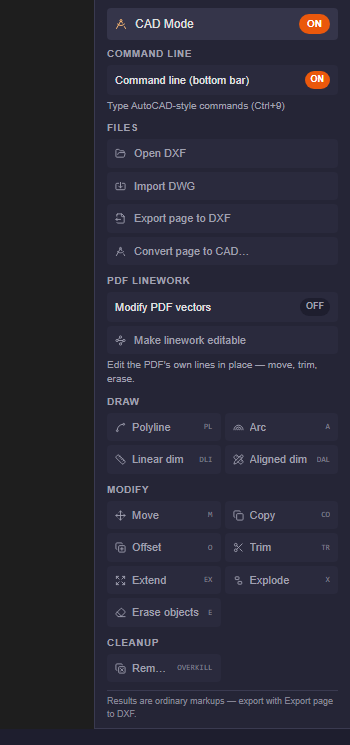
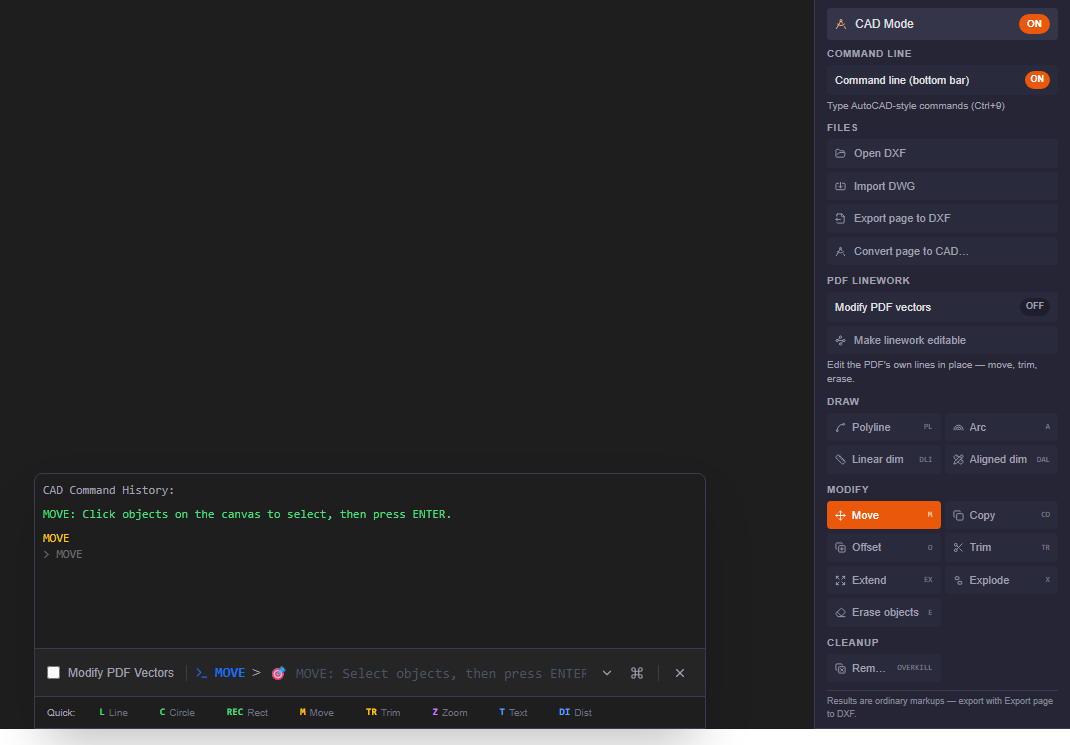
Turn on CAD Mode in the right panel and the sidebar fills with the whole drafting vocabulary: a command line (Ctrl+9) that takes the same commands and aliases you know — MOVE, COPY, OFFSET, TRIM, EXTEND, EXPLODE, OVERKILL — one-click buttons for the common ones, file buttons to open DXF, import DWG, and export the page back to DXF, and a "Make linework editable" switch that turns the PDF's own vector lines into geometry you can move, trim, and erase. Everything you draw lands as an ordinary markup.
PDF is where CAD work goes to die
A drawing leaves CAD the moment it becomes a PDF, and from then on every fix costs a round trip: find the model space, open the CAD seat, change the linework, re-plot, re-issue. Most corrections are not design work at all — a dimension string that needs nudging, a grid line that overshoots the border, a revision cloud that should be geometry instead of a raster scribble. Twenty seconds of drafting, gated behind a piece of software the reviewer does not have open.
So the industry workaround became the redline: mark it up in the PDF, send it back, let a drafter transcribe it into CAD later. That transcription step is where intent gets lost and where half a day goes.
One panel, the whole drafting vocabulary
- Command line — a switch turns on the AutoCAD-style command bar at the bottom of the workspace (Ctrl+9). Type the commands you already know, with the same aliases: PLINE (PL), ARC (A), MOVE (M), COPY (CO), OFFSET (O), TRIM (TR), EXTEND (EX), EXPLODE (X), ERASE (E), OVERKILL.
- Files — open a DXF straight into a tab, import a DWG (cloud-converted to PDF in about ten seconds), export the current page back to DXF, or convert the page to a full CAD format.
- PDF linework — the part that is not in any other PDF editor: "Make linework editable" converts the page's own vector geometry into objects you can select and edit, and "Modify PDF vectors" lets you marquee-select those objects.
- Draw — polyline, arc, linear and aligned dimensions, laid down with the same click-points flow as CAD.
- Modify — move, copy, offset, trim, extend, explode, erase, with the select-objects → base point → distance sequence you already have in your fingers. Typed distances and angles work too.
- Cleanup — OVERKILL removes duplicate linework, the same command you would run before issuing a set in CAD.
Muscle memory, not a new tool
The value of CAD Mode is that it asks nothing new of you. The commands have the same names and the same two-letter aliases. The prompt sequence is the same — select objects, press Enter, pick a base point, type the distance. The command line sits at the bottom of the screen where it has always been, complete with a history of what it asked you and what it did.
It also stays out of the way. The command line is off by default — the first time you press Ctrl+9, or flip it on in the CAD Mode panel, the bar appears; turn it off and the space goes back to the share dock. People who never draft never see it; people who live in it get it in one keystroke.
The part CAD cannot do: edit the PDF itself
Everything above could be dismissed as "drawing on top of the PDF" — until the linework section. Run "Make linework editable" and the page's own vectors — the printed grid lines, the dimension strings, the detail callouts — stop being ink and become selectable objects. Switch on "Modify PDF vectors", marquee across the geometry, and then MOVE, TRIM, or ERASE the drawing's own lines in place.
That is the workflow CAD cannot offer, because CAD never sees the issued set. Extending a detail line that was cut off at the border, trimming a grid line that overshoots, deleting stray construction geometry — the fixes that used to need the source file now happen on the deliverable itself, in the review tool everyone already has open.
A bridge in both directions
CAD Mode is also the import/export desk. A DWG arrives by email — import it and it opens as a normal PDF tab in about ten seconds, no CAD seat required. A DXF opens directly in its own tab for viewing and selection. And the work flows back: everything CAD Mode draws or edits is ordinary markup geometry, so "Export page to DXF" hands the CAD team a file of real vectors they can reference into the model — your redlines arrive as linework, not as pictures of linework.
Where it earns its keep
- Reviewers correcting drawings: fix dimension positions, trim overshot lines, add the missing extension line — right where you found the problem.
- Drafters doing quick revisions: the select-move-offset-trim vocabulary you use all day, on the issued sheet, without a CAD launch.
- Field and as-built markups: drawn with real geometry (polylines, arcs, dimensions) instead of freehand, then exported to DXF for the design team.
- Set hygiene: OVERKILL a page's duplicate linework and erase stray vectors before the set goes out.
- Anyone handed a DWG or DXF: open it, measure it, mark it up, export it — without owning the authoring tool at all.
Honest limits
CAD Mode is drafting-grade editing on the deliverable, not a parametric modeler: there are no constraints, no blocks with attributes, no sheets-and-layouts workflow, and the edits are markup-level changes on a PDF page — the authoritative model still lives in the source CAD file. DXF tabs are view-and-select today; the draw and modify commands apply to PDF pages. For new design work you still want a CAD seat. For the ninety percent of drafting that happens after the drawing leaves CAD, the right panel is now enough.
Everything in this article runs in the live PDFDepth workspace — the same app the workflows above were verified against.
Key takeaways
- CAD Mode in the right panel bundles the command line, file import/export, PDF linework editing, and one-click draw/modify/cleanup commands.
- Same vocabulary as AutoCAD — PLINE, MOVE, OFFSET, TRIM, EXPLODE, OVERKILL — with aliases, typed distances, and a command history.
- "Make linework editable" turns the PDF's own vectors into objects you can move, trim, and erase — the fix happens on the issued sheet.
- DWG imports to a PDF tab, DXF opens directly, and markups export back to DXF for the CAD team.
- Markup-level editing, not parametric CAD — for the review, redline, and as-built work that happens after the drawing leaves the model.
Related questions
The drafting set: PLINE, ARC, linear and aligned dimensions, MOVE, COPY, OFFSET, TRIM, EXTEND, EXPLODE, ERASE, and OVERKILL — with the usual two-letter aliases (PL, A, M, CO, O, TR, EX, X, E). The command line (Ctrl+9) also exposes the wider command set, including drawing, annotation, and utility commands.
Do it in PDFDepth
In the app: Right panel → CAD Mode
Try it free — no signup, no upload
Related articles
Put it into practice
Everything above runs inside the PDFDepth workspace — free for 14 days, no credit card.
Start for Free