Inside the Workspace · Updated October 19, 2026
What is MathFlow and why is it included with PDFDepth?
Short answer
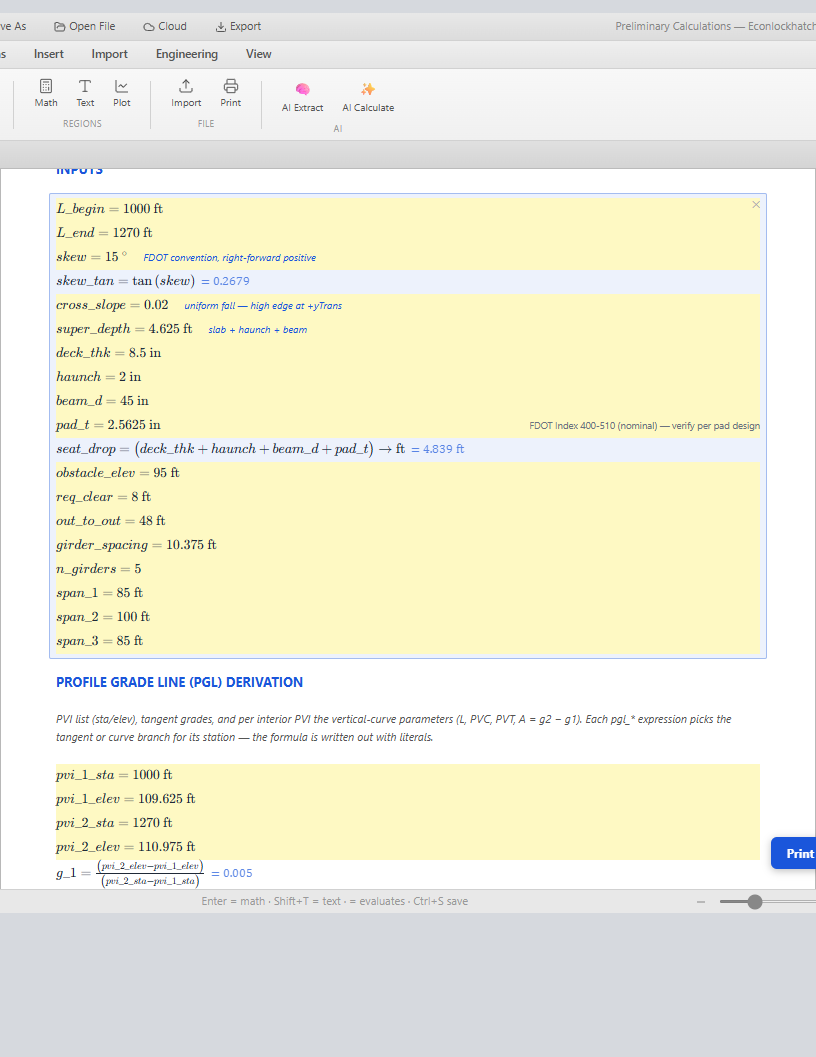
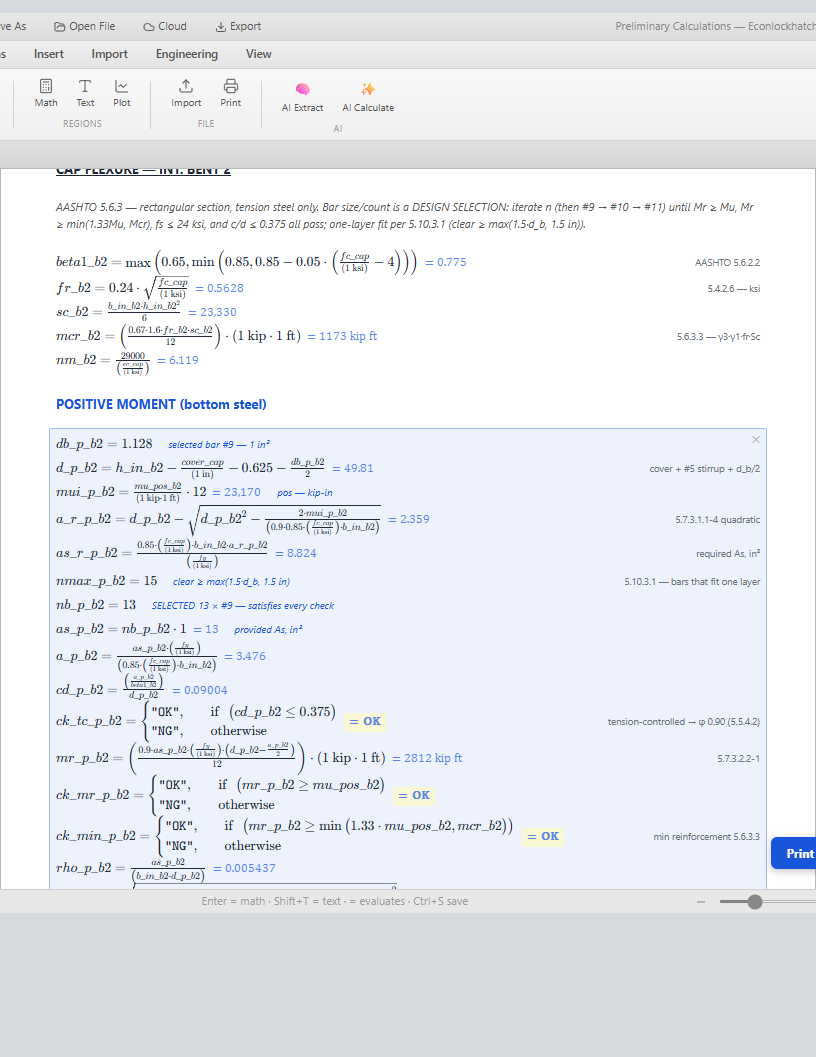
MathFlow (mathflow-worksheet-app.web.app) is a Mathcad-style engineering worksheet that runs entirely in the browser: typed math regions evaluate live with real units (ft, ksi, kip·ft), KaTeX renders every expression like a printed calc sheet, and documents save as open JSON. Every paid PDFDepth subscription includes it — click the Σ button in the Blueprint header and you land inside already signed in, no second account. Bridge Studio hands it a full preliminary-calculations book directly: spans, girder selection, bent cap flexure, piles, and the finish-grade derivation open as live, editable math you can audit and change.
What MathFlow actually is
MathFlow is an engineering worksheet, not a calculator and not a note-taking app. A worksheet is a page of regions — math, text, plot, table, image — and every math region is live: define `L_span = 100 ft` once and every expression that references it re-evaluates the moment you change it. That live-recompute document model is the thing engineers bought Mathcad for since the 1990s, rebuilt for a browser tab.
The math engine is unit-aware throughout — the part spreadsheets never get right. Lengths, forces, stresses, and moments carry real dimensions; results render in compatible units (ksi, kip·ft, ft²) chosen from a live conversion dropdown, and mixing incompatible units fails loudly instead of silently producing a wrong number. That alone is worth the switch for anyone who has hunted a unit error through a spreadsheet.
What's in the worksheet
- Math regions — typed expressions with LaTeX-quality rendering: fractions, roots, subscripts, piecewise functions, min/max. Results display with the variable name, substituted values, and the evaluated answer in your chosen unit.
- Text regions — the narrative between the math: assumptions, code references ("AASHTO 5.6.3.3"), and design selections written where a reviewer expects to read them.
- Plot regions — inline charts on the page, not a separate dashboard widget.
- Table and image regions — tabulated inputs and figure callouts embedded in the flow of the calc.
- Engineering templates — built-in AISC LRFD steel beam design, AISC column design (Chapter E), and Euler buckling worksheets, so a standard check starts solved rather than blank.
- Works offline once open, saves to the cloud when you want it — worksheets persist to your account and also export as .mflow files.
The open format advantage
Every MathFlow document is a `.mflow` file — readable JSON you can diff in git, generate from scripts, or hand-edit in a text editor without opening the app. Compare that to a proprietary binary worksheet: when your calc file is data, your calc library becomes reviewable, versionable, and scriptable infrastructure.
It also means other software can write worksheets. That is exactly what Bridge Studio does.
The Bridge Studio handoff — where it gets interesting
When Bridge Studio designs a bridge it doesn't just draw sheets — it knows every derived value: span lengths, girder section, cap dimensions, pile data, the finish-grade profile. The Export calc book button packages all of it into a complete preliminary-calculations document — cover sheet, table of contents, section dividers, and numbered derivation pages — and opens it in MathFlow through a compressed deep link. No file download, no import dialog.
What lands is not a static printout: every line is a live math region. The AASHTO 5.6.3 cap-flexure derivation shows `beta1`, `fr`, `mcr`, the quadratic required-steel solution, and the OK/NG checks — each carrying its clause reference — and if you change `cover_cap` or a bar size, the whole downstream chain re-evaluates. This is the audit trail reviewers actually want: the plan set says what was designed, the calc book shows why.
AI, pointed at real engineering work
- AI Calculate — describe the check you need ("bearing stiffener at the interior bent") and get a structured calc region, not prose.
- AI Extract — point it at a PDF and it pulls engineering parameters — loads, dimensions, material properties, code references — matched to worksheet variables. Plan-review criteria from a spec sheet become named inputs.
- Mathcad PDF reconstruction — upload a printed-out legacy Mathcad sheet and the AI rebuilds it into a live, editable worksheet instead of a dead scan.
- Plan-review extraction — a configurable prompt template targets the loads, dimensions, safety factors, and code references (IBC, ASCE 7, AISC, ACI) your reviewers care about.
MathFlow vs. Mathcad — an honest comparison
Mathcad Prime is a deep, mature product — nobody should pretend a web app matches it feature-for-feature. But for the daily worksheet workflow most engineers actually use — typed live math with units, plots, and a printable calc — MathFlow is the better version in the ways that matter now:
What the subscription actually gets you
A paid PDFDepth subscription includes MathFlow at no extra charge — the Σ button in the Blueprint header opens it signed in through single sign-on, with the license expiry mirroring your subscription. The two products are built to interlock: Blueprint is where the drawing lives, MathFlow is where the numbers live, and the calc book is the bridge between them.
If you only want the worksheet, MathFlow also stands alone — free to try, with a one-time purchase far below a Mathcad seat. But bundled with PDFDepth it turns the suite into the full engineering loop: design in Bridge Studio, draft the sheets, open the derivations in MathFlow, mark up the review in Blueprint, and share it as a smart link.
| MathFlow | Mathcad Prime | |
|---|---|---|
| Cost | $0 to try; included with PDFDepth, or ~$250 standalone | ~$870+/seat/year |
| Install | Zero — runs in any browser, any OS, even a phone | Desktop install, 2+ GB |
| File format | Open JSON (.mflow) — diffable, scriptable | Proprietary binary (.mcdx) |
| Units | Live conversion dropdowns on every result | Strong but static |
| Collaboration | Cloud sync, URL deep links, worksheet import | Local files, email them |
| AI | PDF→worksheet reconstruction, AI calc generation, variable extraction | None |
| Templates | Built-in AISC LRFD beam/column, Euler buckling | Build your own |
| Legacy import | Reads .mcdx/.xmcd and rebuilds Mathcad PDFs with AI | Native |
| Breadth | Focused: the daily worksheet workflow | Deeper feature surface overall |
References
Everything in this article runs in the live PDFDepth workspace — the same app the workflows above were verified against.
Key takeaways
- MathFlow is a live, unit-aware engineering worksheet — the Mathcad model rebuilt browser-native.
- Every paid PDFDepth subscription includes it via one-click SSO (the Σ button) — no second account.
- Bridge Studio exports a complete preliminary calc book — derivations with clause references — that opens as live math you can audit and re-evaluate.
- The .mflow format is open JSON: diffable, scriptable, and writeable by other software.
- Mathcad still wins on raw feature breadth; MathFlow wins on cost, zero install, open format, AI-assisted reconstruction, and the Blueprint integration.
Related questions
Paid subscribers get a Σ button in the Blueprint header — one click opens mathflow-worksheet-app.web.app signed in via SSO, with access tied to your subscription expiry.
Do it in PDFDepth
In the app: Header → Σ button (paid subscribers) · Bridge Studio → Export calc book
Try it free — no signup, no upload
Related articles
Put it into practice
Everything above runs inside the PDFDepth workspace — $1 a day for up to 14 days.
Start for $1/day